Friday, November 6, 2015

Sending an email using CLI and Python on Onion Omega

I received my Onion Omega which I backed on Kickstarter in  April, today and being a weekend wanted to start off with something simple. I've programmed in python before and while browsing the FAQ and eventually the OpenWRT pages about installing python I saw the python-email library. So I decided to write a python script to send an email from the Onion Omega to my Gmail address. The idea being that once I connect some hardware like a switch or my home door bell to the Onion, it can email me if there is a new activity.
The first thing I searched for was how to send email using the CLI. I found this useful link (http://wiki.openwrt.org/doc/howto/smtp.client) and decided to use mailsend to try and send an email. Here are the steps that I followed:
Step 1: Install mailsend
opkg –install mailsend
Step 2: Use mailsend to send an email to my account. I had to experiment with different options but eventually the following worked
mailsend -to recipient@gmail.com -from youruserid@yourhost.com -ssl -port 465 -auth-login -smtp host236.hostmonster.com -sub test +cc +bc -v -useryouruserid@yourhost.com -pass “yourpassword” -M "Your message here"
Somehow I’m unable to send an email from my Gmail account so I used another host that my company uses.
Sending emails via Python Script
Step 1: Install Python (http://wiki.openwrt.org/doc/software/python)
Install python on Onion. I tried installing python-email only but the library had dependencies to many other libraries and after fixing those dependencies, I still had more dependencies. So I decided to install complete python instead of python-light
opkg -update
opkg –install python
Step 2: Write the script to send an email
#!/usr/bin/python
import smtplib
sender = ' youruserid@yourhost.com '
toaddrs = “recipient@gmail.com '
message = """From: Onion Omega Onion@onionomega.com
To: Recipient < recipient@gmail.com >
Subject: SMTP e-mail test
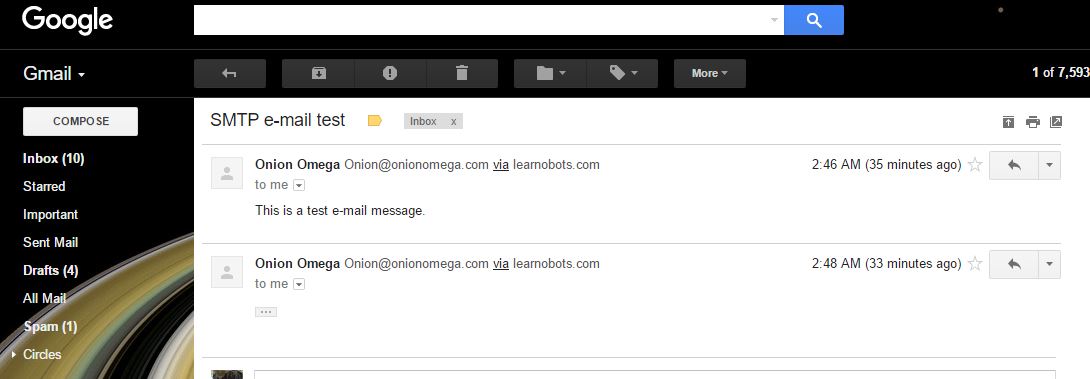
This is a test e-mail message.
"""
#Credentials
password = 'yourpasswordhere'
#The actual mail send
server = smtplib.SMTP_SSL('Your SMTP server address here :465') #(‘Host:Port’)
server.login(sender,password)
server.sendmail(sender, toaddrs, message)
server.quit()
print "done"
Success!
gmail.JPG
Links:
http://www.tutorialspoint.com/python/python_sending_email.htm
Another example to send email using SSL via python
http://stackoverflow.com/questions/24672079/send-email-using-smtp-ssl-port-465

UPDATE: The tutorial is now part of the official Onion Tutorials list! You can find it on https://wiki.onion.io/Tutorials/Sending-Emails-With-Python 

Sunday, February 22, 2015

The story of LearnOBots {So far}

So once again I have been very slow in putting my thoughts here. This time I have a good reason. I have been busy and this busy-ness has yielded some interesting results. In my lab I started off developing 3d printed robots for teaching and learning. Starting last summer I partnered with a friend and launched an experiment. Could we scale up our idea and use it to teach about STEAM (Science, Technology, Engineering, Arts and Mathematics) to school going kids? Would parents be interested and more importantly would kids be interested in learning about robotics. We started off with a workshop at Minerva which is an event's place in Islamabad. We had a great response and attracted people of all ages. Our youngest participant was 6 years old and the oldest was 26! Everyone had absolute fun including us, as this was our first experience. So began our journey with LearnOBots. Following are a few snapshots from our first and second workshops. More pictures are available on our facebook page.


After the first workshop we knew that the idea had traction and could be scaled up. With very little money to bootstrap we went about planning our next workshop. This time we changed places and still attracted some participants. We managed to save on a few expenses as well. We also managed to create our first product the LearnOBots 3d printed mobile robot kit.


Our second workshop included more girls and some more challenging activities. Here are a few pictures from the second workshop.


As you can see from the pictures the workshop also attracted girls along with boys. This helped us in understanding the market need which clearly showed that such activities are not only required for boys but are equally relevant for girls. So we went about designing workshops for girls as well.

After launching our workshops and our product in the form of the 3d printed mobile robot kit, we partnered with NUST-SEECS, which is one of the top computer science schools of Pakistan. The partnering meant we could be based at their wonderful campus and we could show the kids exactly how it is like to be at an engineering university which attracts the top talent of Pakistan. With this partnership we designed and executed our 3rd workshop which included many new activities. These included robotics using Lego Mindstorm Kits, electronics using Snap Circuits, and another new product that we developed for this workshop called the Solar House. The Solar House is a very interesting product that teaches kids about arts, crafts as well as electronics. We also introduced 3d modeling and printing in the 3rd edition of our workshop. This turned out to be a lot of fun for everyone as not only did the kids learn to model in 3d they also got to print their own makings and take them home with them. Following are some pictures from the third workshop.


We are well and truly on are way to inspire the kids of Pakistan towards STEAM. In recent months we have received a bit of web media attention as well. A few good blogs have written about our initiative, here are some very interesting articles about LearnOBots. 


The best one that we (myself and my co-founder) like is someone in the US writing about LearnOBots in his personal blog. 

"Could you imagine seeing an article like this even 5 years ago? 3D technology... robots programmed by kids....... in Pakistan!?!?!?

My daughter recently started her first economics project in her 4th grade class. What technology is being utilized by the teacher to teach such an important and complex subject? Play-doh. Kids the same age in a "3rd world" country of Pakistan are programming robots while my child makes a dog and a dollar sign out of play-doh. Something is not right here! "

For the full blog post have a look at 
The LearnOBots journey has just started and let's hope it is a long and successful one. I'll keep posting updates about my startup. Hopefully!
For updates about learnOBots you can follow it on

Tuesday, October 21, 2014

Final Year Projects

I got an email from a student regarding her idea for a final year project. I gave her a detailed reply and thought sharing this may help guide other students so here goes...

My name is XXXX. I'm writing to have some guidance from you, for my final year project. I obtained your email address from the XXX university website.
Sir I’m doing my final year project; the topic of my interest is brain controlled wheelchair. I need some direction for the topic I have opt. What novel can I do in this area?
I also need to ask that is it the best choice or should I go for something else? What else do you suggest for this area?
Thank you Sir.

Respectfully,
XXXX
Student Of BS(CS)
Fatima Jinnah Women University

And here is my reply that I hope may prove useful for other students.


Questions that you should ask yourself first
In the first part you have asked for direction on your idea brain controlled wheel chair. It is an interesting idea though in no way is it novel. Just a simple search on Google will list a number of such projects done before including a complete instructable (http://www.instructables.com/id/Brain-Controlled-Wheelchair/). I have seen students do this same project in Pakistan as well (I remember seeing one in Islamabad at FIT). So the questions that you should be asking yourself when deciding on an idea to work on is

Q. Why do I want to build this?
Q. Does it solve a particular problem or need?
Q. Would it be practical enough to be used in Pakistan (For example Are the EEG Sensors easily available locally or easy to re-produce locally)
Q. If I made one, would it be cheap enough that people would be willing to buy it?
Q. Would it be practically usable? How much getting used to would be required by someone if that someone decides to use it?
You will notice that in the question list, I haven't listed down a single technical question or challenge. When you work on idea, you usually build a prototype first to prove your point that the idea is possible. In this particular case we know that the idea is possible and people (read students) have built it quite a few times, but we haven't seen it as a commercial product just yet. So the question comes down to whether it would be really useful to build a brain controlled wheel chair in the Pakistani context.
The second part of your question is more general as to what kind of final year project should you be working on. The answer that I'm giving you is the discussion that I have with my students.
Research based versus non-research based projects
There are 2 kinds of projects. Research based and non-research based. At under graduate level most students go for non-research based projects which are mostly practical in nature. Those who are interested in research based projects are usually who plan to go for a Masters degree by research or a PhD later. So the first question that you should ask yourself is what excites you? Doing research which involves reading research papers, understanding analyzing and implementing them (in probably Matlab) and coming up with your own improved techniques or algorithms in a particular area. Or building a project which involves less research and more practical stuff like understanding new programming libraries or algorithms and implementing them to solve a problem.
Choosing the right supervisor
Once you decide for a particular area you must select a supervisor who most suits your project and your area. For example if you want to do a research based project, find a supervisor with a PhD. If you want to do a more practical project find a supervisor who has worked in the industry or has worked on practical projects.
Hardware versus Software
If you decide to build a project that is mostly software  then you must see if you have access to the right development tools. For example most Pakistani universities are part of the Microsoft Academic Alliance which gives them access to most Microsoft development tools. If you plan to use a particular library that is not freely available, can you get an academic free version for it? Or can you find an open source alternative for that library?

If you are planning to build a hardware project, there are some important questions to consider. In most cases hardware is unavailable locally, although there are now a number of local websites that offer microcontrollers and electronics parts. Here is a list:


You may also need 3d printing to build your hardware prototype, in this case you can get your stuff printed from  https://www.facebook.com/3DPrintingPK or if you can convince your university or have the finances you can get a 3d printer in Pakistan from http://xplorer3d.com/.

Funding your project
One of the most important aspects that you must consider before going for your idea is to figure out how you are going to finance your project. There are many ways to fund your project.
 
1.    1.  National ICT R&D fund runs a program (http://www.ictrdf.org.pk/ngiri/main1.htm) where they finance innovative FYP ideas, mostly for buying hardware. You can get up to Rs 65000 in funding. Usually the fund takes a long time to release funds so be prepared to spend from your own pocket initially if you plan to take this route.
2.    2.  Another way is to find someone willing to fund your idea. There are several companies in Islamabad, Lahore and Karachi willing to work with Final Year Projects. The key is to find a company that works in your area of domain and would be willing to work with you. A good idea is to find someone from the faculty who knows people in a company you are looking for. Most faculty members have friends and colleagues working in local companies.
3.   3. The third way is to fund your project yourself.  In my case I wanted to build a robot which required considerable finances in buying stuff and getting things done. I solved this problem by convincing my friends to work with me and ended up with a group of 5 students. It helped me in sharing the costs and we managed to spend more than 50,000 on our hardware and manufacturing. Be careful though, most universities usually only allow a maximum of three students per group.

Finding the right idea?
One of the key questions is to understand what kind of idea you can work on. Final year project is one of the most important activities in your undergraduate studies that can define your future direction. So the decision should be taken very wisely. If you plan to go for a Masters degree and are good at reading papers then find a research based project. If you plan to work for a company even then you can do a research project or vice versa. There is no fix path. For example a student of mine did a research based project on data mining and started working at IBM (Islamabad) in the Business Intelligence (BI) division. After working for a couple of years at IBM he has now gone for his Masters in BI.

When students come to me and ask for advice regarding projects, I usually tell them to find a problem to solve or a need to fulfill. So how does one go about finding a problem? I have devised a top down approach to finding the right problem to solve.

The key is to think big! Ask yourself what kind of problem can I solve in the universe? Can I create an algorithm to enable fully autonomous operation of the Mars Rover? If you think that is too farfetched then narrow down your search. Think of what global problem can you solve. Have you ever looked at United Nation’s Millennium Goals that address global issues? There are many competitions as well (ITU Young Innovator’s Program) that encourage one to solve global problems using Information and Communication Technologies (ICTs). If you still can’t find a problem then look for a local problem to solve. Think of the problems that face Pakistan today. Poverty, lack of education, lack of health facilities, etc there are practically thousands of problems to solve. So choosing to solve one can benefit everyone. Finally if you still haven’t found a problem to solve then look around you? Can you find problems where you live or on your university campus? Can you automate a certain process that could make life easier for students? For example every university has a tedious clearance process through which each student has to go through once he/she graduates wasting everyone’s time and energy! Can you somehow automate this problem? There are once again plenty more to solve.

Finally one way to find ideas is to read, read and read a lot. Read about things that interest you and you’ll surely get ideas for your final year project. And once you find an idea, then discuss it with your peers, your faculty and even your parents. Feedback helps refine ideas and everyone will give their own perspective which will help in improving your idea!

Good luck in finding the right idea for your final year project. Feel free to email back if you have further questions.
Best Regards,

Wednesday, July 16, 2014

Pygame example (Window, Sound, Key handling)

Here is a small introductory example for pygame. In it we can learn to initialize pygame, create a window, display an integer as text on the screen and play sounds.

Pressing the key a will increase the score by 5 and update the value of the integer on the screen and also play a tick sound. Meanwhile the Mario soundtrack will keep running in the background.

You need to have at least python 2.7 with pygame installed.   

------------------------------------------------------Example --------------------------------------------
import pygame, sys
from pygame.locals import *

pygame.init()
DISPLAYSURF = pygame.display.set_mode((400, 300))
pygame.display.set_caption('Hello World!')

WHITE = (255, 255, 255)
GREEN = (0, 255, 0)
BLUE = (0, 0, 128)
score=27

fontObj = pygame.font.Font('freesansbold.ttf', 32)
textSurfaceObj = fontObj.render(str(score), True, GREEN, BLUE)
textRectObj = textSurfaceObj.get_rect()
textRectObj.center = (30, 20)

pygame.mixer.music.load('mario.wav')
pygame.mixer.music.play(-1, 0.0)

while True: # main game loop
     DISPLAYSURF.fill(WHITE)
     textSurfaceObj = fontObj.render(str(score), True, GREEN, BLUE)
     DISPLAYSURF.blit(textSurfaceObj, textRectObj)
     for event in pygame.event.get():
         if event.type == QUIT:
             pygame.mixer.music.stop()
             pygame.quit()
             sys.exit()
         elif event.type == KEYUP:
                 if event.key==K_a:
                     soundObj = pygame.mixer.Sound('beepingsound.wav')
                     soundObj.play()
                     score= score +5
     pygame.display.update()

Wednesday, May 28, 2014

In car computing

I've been fascinated by the mp3car.com community which started off by simply installing computers in cars and has evolved over the past few years into a place where you can buy a complete car PC to install in your car which runs as smooth as any plug and play device. No need for 12V to 220 V inverters, no need for extra screens, complete in car PCs are available that anyone with basic knowledge of electronics can install in their cars.

As usual with everything else in Pakistan, getting these systems is expensive and definitely unaffordable for me. So I wanted to install something that did not require a lot of tinkering with my cars electronics and would give me everything that an in car PC has. When the Raspberrry PI a $35 Linux computer came out I got very excited and ordered one. I also used it to develop a product prototype for a company. The one I bought was simply lying around unused so I installed it as my Carputer! 

I have installed a touch screen windows XP based handheld computer (UMPC, an ultra mobile PC, these were popular before the iPad came out) before in my car. The problem with this is it takes too much time to boot into Windows and even shutting down takes time. Refer to the following picture. 

It was never the perfect solution. I needed something that was quick to boot and quick to shutdown. I also changed my car from my CJ-5 jeep to a modern honda city sedan. This car belonged to my father who had changed the stock stereo to a chinese made touch screen based system that includes a DVD player, Radio, USB input, a TV and Aux input. It lacked a GPS and any navigation software which is bad.

Since I had a Raspberry PI lying free, I decided to install that in my car. The car already had a screen that had an Aux Audio/Video port that I was using up till now to connect my iPod shuffle. In order to use the PI as a multimedia device, Raspbmc is a great piece of software which is a port of XBMC for the Raspberry PI. I followed the following steps to install the Raspberry PI in my car.

Step 1:Download raspbmc from http://www.raspbmc.com/download/ 
 
A setup file can be downloaded for Windows 7/8 which can be run to install Raspbmc on an SD card. This is the route I followed. I used a 4gb sd card which was formatted by the setup. 
 
Step 2: Connect the SD card in the raspberry PI and connect it to a network
 
I did this by connecting the Raspberry pi to my TV  and let it run. It took about 30~45 minutes to download the Raspbmc from the internet and install it on the SD Card. The setup is completely automated so no intervention was required and in the end the system was running Raspbmc. 

Step 3: Add media to your USB device 

I added some sound and video files to test

Step 4: Install it in your car

This step turned out to be the most easy one and that took the least possible time. Since my Aux port in the stereo was readily accessible through an extended Audio Video cable, all I needed to do was connect the video and the audio ports to my Raspberry PI which was enclosed in a 3d printed box. Two pieces of paper tape at the back of the casing and the PI readily stuck to the carpet beside the center console, easily hidden and out of sight. I powered the PI using my 12-220v inverter which outputs 220 v as well as 5v through a USB port. A simple turn of the car keys and the Raspberry PI booted into XBMC within 20 seconds. I've connected a mouse to interact with the XBMC. 

Step 5: Improvements

Some of the improvements that I plan to make include
  • IR Remote interface with the PI, which will help me do away with the mouse
  • Internet connectivity using either PTCL's evo dongle or using my mobile's internet as a hotspot. In this case I will need a USB wifi adapter for my PI.
  • I have a warid connection and my phone is not 4G so I'm waiting to see whether I should be porting to a 3g network.
  • Touch screen. Maybe when I have enough money to spare, I would like to replace my existing touch screen with a one that is compatible with a Raspberry PI
Enjoy the pictures!